Match the tool to your boundary
| Approach | Acts on | Main limitation |
|---|---|---|
| Website / DNS blocker | Addresses or domains | Not a per-image decision inside an allowed app |
| Whole-app restriction | Access to the app | Also stops browsing you may still want |
| Platform controls | Recommendations, labels and account choices | Scope varies by platform and setting |
| ReelShield | Detected selected visuals in supported Android apps | Can miss content or hide normal content; Accessibility required |
Cloudflare describes its family DNS service as filtering queries to categorized domains. That is useful for website boundaries. For a mixed social feed, the distinction is important: allowing the service’s domain does not select which individual image is acceptable. Blocking a shared service can also affect wanted material.
Cloudflare: domain-based family filtering · Official platform guidance.
Use platform controls first
For Instagram, start with Sensitive Content Control and recommendation feedback. For Reddit, start with NSFW visibility and blur preferences. TikTok has its own controls; this first cluster does not provide a verified current TikTok menu walkthrough.
These options remain useful without ReelShield. Ask what any proposed blocker actually blocks: a website, a whole app, a labelled post or visible image content. Those are not interchangeable promises.
How ReelShield approaches in-app filtering
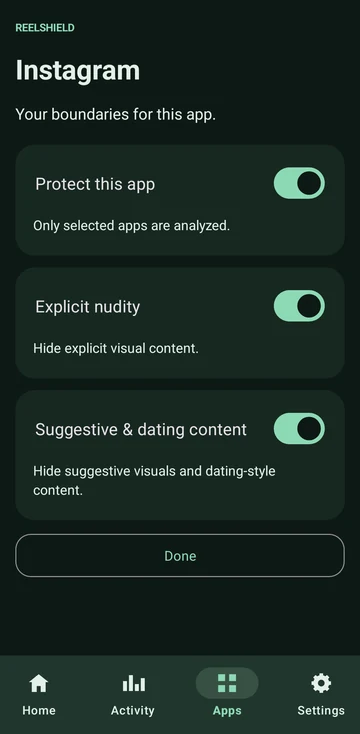
ReelShield offers another approach on supported Android 14+ ARM64 devices. Choose protected apps and Explicit nudity or Suggestive content filtering; the app calls the latter “Suggestive & dating content”. It analyses visible content on-device and covers selected unwanted visuals when detected. Tested apps include Instagram, Reddit and TikTok; support is not universal.
You enable Accessibility access yourself. Screen images used for protection are not uploaded to ReelShield servers. No ReelShield account or ads. The Privacy Policy explains local activity, technical metadata and Google Play purchases.
Each protected app has independent filters. You can use an optional local-time schedule, pause protection and see local shield-event/protected-time statistics. Home, unprotected apps and periods when protection is not eligible do not count as active protection time.
The opaque Shielded cover leaves the intended status and lower control/scroll regions usable. It is a cover, not deletion of a post, a change to your social account or a network-wide block.
Before choosing a social-media blocker
- Check Android support: ReelShield requires Android 14+ on a supported ARM64 device.
- Check exact apps: Instagram, Reddit and TikTok are tested examples, not every app.
- Read the Accessibility explanation and enable access yourself only if you agree.
- Look for pause/off controls and per-app choices.
- Distinguish on-device analysis from separate purchase and diagnostic handling.
Automated filtering can hide normal content or miss unwanted content. A cover appears only after content reaches the screen and is detected, so this is not a guarantee of zero exposure. Native controls and your own account choices still matter.
What stays on your device
ReelShield has no account system. Screen images used for protection are processed on-device and not uploaded to ReelShield servers. Basic activity stays local. Google Play handles purchases separately. This is not a claim that Android or every library processes no technical metadata. Read the full privacy policy.
Trial and one-time access
The planned offer is a 7-day app-managed trial, then €19.99 one-time lifetime access. No subscription or ads. Trial time starts with the first successful real protection activation in a selected app, not installation or the Protection Check. It continues during pauses and schedule gaps, and never automatically charges you.
Coming soon on Google Play. No public production download link is offered here. When available, purchase restoration uses the Google Play account that owns the lifetime purchase and the app’s real restore flow.
Common questions
Is ReelShield a VPN or DNS blocker? No. Its described feature is on-device visual filtering.
Does it block every NSFW topic or creator? No. The two selected filters are Explicit nudity and Suggestive content, not every possible meaning of NSFW.
Can I see it before launch? Watch the illustrative demo and real app screens.