Name the content you want less of
People use “soft porn” for body-emphasis framing, provocative poses or repeated promotional content that may not show explicit nudity. “Thirst trap” describes a style or perceived intention, not something reliably established about a person from one photo.
Clothing alone does not settle context. Ordinary swimming, sport or fashion can include visible skin without being the sexual recommendations you are avoiding. Define a boundary around content rather than treating a gender, body type or occupation as the problem.
Make native controls do their part
Start with the Instagram controls for sexual posts and Reels. Use the most restrictive sensitive-content option offered and Not interested on unwanted recommendations. Reviewing an account you already follow is a separate step.
Following or Favorites, where available, provides a more deliberate selection. A broad recommendations reset is not a dedicated “remove thirst traps” command. Our guide to persistent body-focused recommendations separates ranking guesses from account-level choices.
What hidden words can do
Meta documents a Hidden Words option for recommendations containing specified caption terms. This can address repeated wording; it is not the same as examining an image. A post may have a neutral caption, changed spelling or none of the terms you selected.
Choose terms matching actual unwanted examples rather than broad labels for people. A creator-platform name can also appear in unrelated reporting or discussion. A longer keyword list is not evidence of more accurate visual filtering.
Meta: caption-based Hidden Words and recommendation feedback · Official platform guidance.
Avoid an all-or-nothing expectation
The aim can be less unwanted material while keeping the app useful. A platform may permit a post you do not want recommended. A filter can also hide normal content because context is difficult. Neither outcome proves the creator’s intention.
No promised number of feedback actions or days to “fix the algorithm” is established here. If a surface repeatedly crosses your boundary, choosing a more deliberate feed—or not browsing that surface—can be clearer than repeatedly testing it with unwanted posts.
When a visual cover fits
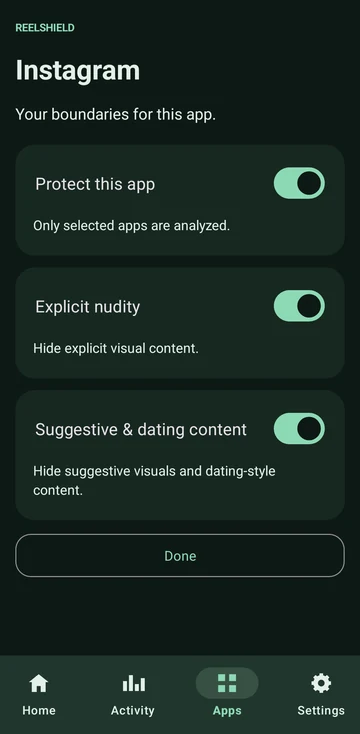
ReelShield offers another approach on supported Android 14+ ARM64 devices. Choose protected apps and Explicit nudity or Suggestive content filtering; the app calls the latter “Suggestive & dating content”. It analyses visible content on-device and covers selected unwanted visuals when detected. Tested apps include Instagram, Reddit and TikTok; support is not universal.
You enable Accessibility access yourself. Screen images used for protection are not uploaded to ReelShield servers. No ReelShield account or ads. The Privacy Policy explains local activity, technical metadata and Google Play purchases.
Choosing Suggestive filtering does not turn ReelShield into an OnlyFans-account detector or a tool to suppress a gender. The social-media blocker comparison explains the difference between filtering images and blocking domains or whole apps.
Automated filtering can hide normal content or miss unwanted content. A cover appears only after content reaches the screen and is detected, so this is not a guarantee of zero exposure. Native controls and your own account choices still matter.
Common questions
Can I keep ordinary fashion and sport while hiding thirst traps? Controls can express that preference, but no automated system promises perfect contextual separation.
Does Less remove every suggestive Reel? No guarantee is made. It is a platform sensitivity choice, not your own individually defined visual rule.
Does ReelShield change my recommendations? No. Its described behavior is covering detected selected visuals while you use a supported app.