Start with Instagram’s own controls
Separate suggested posts from accounts you follow. Changing a recommendation setting is not the same as changing your following list.
- Open your Instagram profile and its menu. In settings, look for Sensitive content or Sensitive Content Control.
- Choose Less, or the most restrictive option offered.
- For an unwanted suggested post, open its three-dot menu and choose Not interested. Use the corresponding feedback on a Reel when offered.
- For posts from followed accounts, review whether you want to unfollow or mute them.
Menu check: Meta documents these controls, but the current Instagram menu tree has not been verified on every app version. Labels and availability can vary by account, age and rollout; look for the named control rather than following an old screenshot.
Meta: what Sensitive Content Control does · Official platform guidance.
Meta: Less and Standard content-control choices · Official platform guidance.
Consider a broad recommendations reset
Meta documents Profile menu → Content preferences → Reset suggested content. Read the confirmation before proceeding. This resets recommendations broadly, not just sexual content. Personalization can develop again with later use. If the control is absent, do not assume clearing your app cache does the same thing.
Meta: recommendations reset and feedback · Official platform guidance.
Match the action to what you are seeing
- Suggested posts: use recommendation feedback and content sensitivity.
- Accounts you follow: review those accounts directly.
- A particular unwanted account: consider an account-level block where appropriate.
- A suspected rule violation: use the reporting flow. Not liking a recommendation and reporting a violation are separate actions.
You do not need to keep reopening a post to investigate it. Apply the available feedback and move on to topics you actually want. No verified number of Not interested taps guarantees a clean feed.
Why sexual posts can still appear
A search for “porn” can mean explicit imagery, provocative poses, adult-creator promotions or ordinary content you personally do not want. Those are not necessarily treated alike. A post being allowed does not mean you want it recommended.
For the narrower body-emphasis problem, see reducing soft porn and thirst traps. For persistent recommendations, read why Instagram keeps showing body-focused content.
Where an on-device cover fits
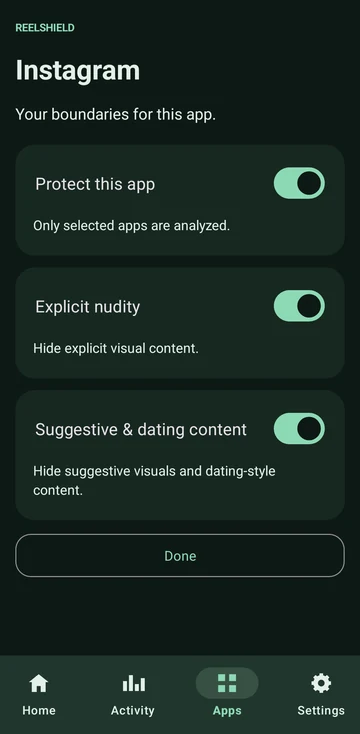
ReelShield offers another approach on supported Android 14+ ARM64 devices. Choose protected apps and Explicit nudity or Suggestive content filtering; the app calls the latter “Suggestive & dating content”. It analyses visible content on-device and covers selected unwanted visuals when detected. Tested apps include Instagram, Reddit and TikTok; support is not universal.
You enable Accessibility access yourself. Screen images used for protection are not uploaded to ReelShield servers. No ReelShield account or ads. The Privacy Policy explains local activity, technical metadata and Google Play purchases.
Automated filtering can hide normal content or miss unwanted content. A cover appears only after content reaches the screen and is detected, so this is not a guarantee of zero exposure. Native controls and your own account choices still matter.
This approach keeps the supported app available. Compare website blockers and filtering inside social apps before choosing an additional layer.
Common questions
Can I block all sexual content? No setting or automated filter should be treated as a guarantee. Combine relevant controls and understand their limits.
Will a DNS blocker remove individual Reels? Domain blocking is not a per-image decision inside a permitted app.
Do I need ReelShield for these steps? No. The native controls above can be used by themselves.